Dear colleagues, As sociologists, we strive to help students engage critically with complex social realities – across cultures, institutions, and identities. Today, I invite you to imagine a learning environment where students don’t just read about migration, inequality, or urbanization – they experience these concepts firsthand. I propose the creation of a Virtual and Augmented Reality Computer Lab within our Department of Sociology. This lab will merge cutting-edge immersive technologies with our core mission: to cultivate global citizens who are equipped to understand and change the world.
Through VR, students could:
Walk through refugee camps, experiencing displacement from a first-person perspective.
Participate in historical protests to analyze civil rights movements.
Step inside a simulated urban neighborhood to explore the dynamics of segregation and gentrification.
AR would enable us to overlay data and stories onto real-world spaces, turning campuses, local communities, or classrooms into interactive sociological case studies.
Pedagogical Benefits
Increase empathy and engagement through embodied learning.
Improved retention and conceptual understanding of abstract sociological theories
Enhanced opportunities for interdisciplinary collaboration (e.g., with anthropology, history, or public health).
Research Opportunities: The lab would also support faculty research – allowing us to design virtual ethnographies, test simulations, or study learning outcomes in immersive environments.
With relatively modest investment in VR headsets, AR-compatible devices, and curriculum design, we can create a lab that not only supports the next generation of sociologists but also redefines how sociology is taught and learned.
Let’s position our department at the frontier of innovation – where technology meets human understanding.
Diversity is one area in the Sociology computer lab that a learning object can help teach. A learning object (LO) is a self-contained learning unit that supports or provides learning. Santos et al. (2022) define LO as any digital or non-digital entity that can be used, reused, and is available on the web. It includes videos, interactive simulations, and multiple other digital formats (American College of Education, 2023).
In the Understanding Cultural Diversity LO, the learner is introduced to the concept of cultural diversity through three objectives: a definition of the key components of cultural diversity, an understanding of the benefits and challenges of cultural diversity in society and the workplace, and the identification of strategies for promoting inclusion.
Backgrounds
We all come from different cultures and backgrounds, and due to the interconnectedness of the world, we must collaborate to achieve our business objectives. As a result, we need to be aware of our diverse backgrounds and appreciate them as assets rather than liabilities to our collective goals. We need to communicate across cultures and not let them negatively impact us.
In our work environments, we must be able to recognize and address implicit bias and stereotyping. This will help us address diversity. The more we are conscious of implicit prejudice and stereotypes, the more we can avoid them. Therefore, self-reflection is a necessary and constant practice.
Global Timeline
A brief exploration of various countries worldwide is conducted to highlight their diverse values and cultures. Strict adherence to time and preplanning is a significant factor in some cultures, but it is rather a fluid experience in others. In addition, an expose is made of leading egalitarian and hierarchical societies to put diversity in perspective, especially in the workplace. Practices in the Western hemisphere are juxtaposed with experiences in the East to illustrate the point. This paints a picture of the manager’s role in various situations. Finally, some countries are mapped on the time dimension to clarify their respect for multiple aspects of life and on the egalitarian and hierarchical dimensions to provide practical examples of cases in point. Short, interactive quizzes (including multiple-choice and fill-in-the-blank questions) are available in every section to provide an engaging learning experience. There are other exercises, such as drag-and-drop, that enable users to interact with the system. Instant feedback is provided to alert the user how successfully they are interacting with the system. The learning object is available at this link: https://elearning.easygenerator.com/7b0b11de-1415-42ea-89ed-509d37d5f583/
Systems
Learning objects need a stable hardware system to operate. A Windows-based system with internet access is sufficient for Understanding Cultural Diversity LO. Because it is web-based, it can also work on cross-platform systems such as MacOS and Linux.
These learning objects are excellent in cementing knowledge, motivating the students, and increasing self-regulation. Unfortunately, in some cases (like the flight simulator experience), learners may experience anxiety and lose the learner-teacher relationship (Dumitrica & Jarmula, 2022). Yet, for all its weaknesses, learning objects still retain merit in successfully and efficiently delivering instruction to the student.
References
Santos, A.I.; Costa, A.C.; Botelho, A.Z.; Parente, M.I.; Cascalho, J.; Freitas, D.; Behr, A.; Rodrigues, A.; Mendes, A.B. (2022). Learning Objects in the Educational Context: The Perspective of Teachers in the Azores. Educ. Sci., (12), 309. https://doi.org/10.3390/educsci12050309
Dumitrica, D. & Jarmula, P. (2022). Teaching Qualitative Research Methods in Media and Communication: The Benefits and Limitations of Digital Learning Objects. The Qualitative Report, 27(9), 1934-1951. https://doi.org/10.46743/2160-3715/2022.5256
The integration of Virtual Reality (VR) and Augmented Reality (AR) technologies into the Sociology Computer Lab will support learning modules in social behavior, urban studies, inequality, cultural diversity and human interaction. The technologies will provide students with deeper understanding and more interactive insights (American College of Education, 2023). It will transform otherwise abstract sociological concepts into immersive, experiential learning opportunities (Chen et al., 2022). Virtual and Augmented Reality can recreate historical events and simulate living conditions in different societies. They can also immerse students in the perspective of marginalized groups (Stelter & Kim, 2023).
Implementation Plan
The proposed technological upgrade to the lab will entail acquiring at least 10 mixed reality headsets such as Meta Quest 3, or Oculus All in one VR headsets, AR-compatible tablets, and two dedicated workstations for VR content development and analysis. These products can be easily acquired through popular retail outlets like Amazon.com, and Walmart. It would also be necessary to subscribe to Educational VR platforms that feature sociological relevant scenarios such as urban cityscapes for urban sociology or interactive simulations on race, gender, and class dynamics.
Budget & Timeline
The initial setup cost is estimated at $22,000. This amount covers hardware, software and training. The implementation of the technology can be completed within one semester, with pilot testing in selected courses. A detailed breakdown of the cost is as follows:
Stelter, A. K. & Kim, E. (2023). Looking Through the Virtual Glasses: Exploring Student Experience with Augmented Reality in Human Anatomy Courses. California Dental Hygienist Association Journal, 41(2).
Social media mining is the process of gathering and studying vast amounts of network data across various social media platforms (American College of Education, 2023). Professionals in different fields can specifically mine data on the networks of their choice to reap benefits that allow them to grow. A teacher, for instance, may be interested in what educators have to offer, which would lead them to grow professionally and expand their professional networks.
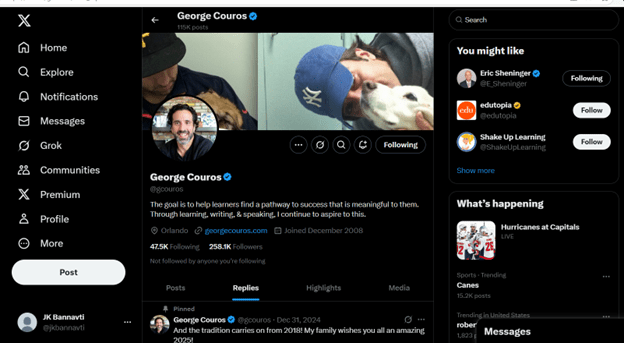
George Couros is also a pet-loving curious George.
Explanation of infographic.
The infographic is the profile page of George Couros, the educator, public speaker, writer, and leadership expert. It features pictures of George and his pet dog, accompanied by lines that capture the goal of the blog: “The goal is to help learners find a pathway to success that is meaningful to them. Through learning, writing, & speaking, I continue to aspire to this.” You can search, comment, tweet, retweet, respond, and follow on the page. Suggestions for you to follow are displayed on the right side of the screen, and a list of menus is located on the left.
Tips for effective social media use.
If social media can grow from 321 million users to 3.7 billion between January 2019 and January 2020, with 66 percent of Facebook users being between 13 and 34 years old, then it goes without saying that by 2025, the number would have doubled among the younger generations, since they are all digital natives (Alshalawi, 2022). The addictive quality of social media is also very telling. To use social media effectively, observe the following:
Keep your browsing to professional content
Focus on an activity, like a product or service, at a time
Rely on credible sources for information
Choose the platform to use based on your needs
Determine who you are writing for or reading from
Be disciplined about what you post; don’t respond to everything
Create a profile and market it properly with high-quality posts
References García-Río, E.; Baena-Luna, P.; Palos-Sánchez, P.; Aguayo-Camacho, M. (2022). Microblogging: an online resource to support education and training processes. Campus Virtuales, 11(2), 39-48. https://doi.org/10.54988/cv.2022.2.1013
Alshalawi, A. S. (2022). The Influence of Social Media Networks on Learning Performance and Students’ Perceptions of Their Use in Education: A Literature Review. Contemporary Educational Technology, 14(4), ep378. https://doi.org/10.30935/cedtech/12164
Technological advances support educators as they design and implement courses to serve their ever-growing population. Although many people look to mobile technology to accelerate this process, there is growing evidence that it could be slower due to a lack of support (Martin et al., 2018). Later studies confirm that although technology is important to education, its primary function is to assist the teacher, who is still critical to imparting knowledge (Pathak, 2022).
IXL
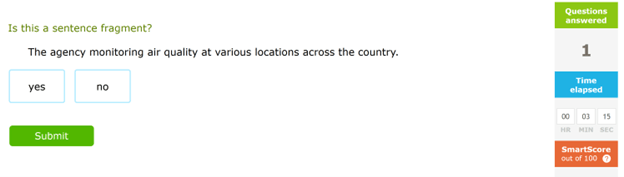
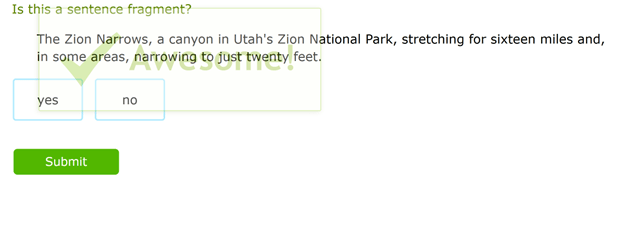
Under the section, Grammar and Mechanics and the topic, Sentences, Fragments, and Run-ons, the assignment requires the student to identify the sentence fragment from the choices displayed. Only one sample sentence is shown for each question, and the user is asked to determine whether it is a fragment by clicking Yes or No. When either Yes or No is selected, the submit button comes alive and can be clicked on to submit the response.
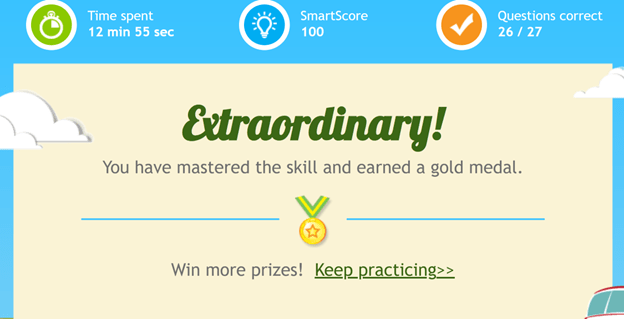
There is a library of more than 100 sample sentences to choose from, and my students vie for a smart score of 100%. A counter also records the answer to each question as a fail or pass. Based on whether the answer is right or wrong, a feedback congratulatory message, or a message of encouragement is displayed. The more responses a student gets wrong, the more the system adjusts the challenge level of the questions. From the questions to the answer, there are only two clicks: one on either Yes or No and the final one on Submit.
IXL has streamlined a rather complex lesson that would have been planned by researching the lesson content from different sources. The choice of sentences and sentence fragments would have also taken more than three hours to construct. The students would have needed to hand-write the answers, and the teacher would collect the scripts, grade them, and provide feedback to the students in another class session. This IXL lesson takes approximately 30 minutes. IXL’s process is automated, with sentences generated as the student answers. The teacher’s feedback is also immediate, direct, and in real-time.
Depending on the student’s performance, the questions are modified, and the student is rerouted to more suitable choices. The teacher can remotely monitor the students if they are in a live class and use Analytics look-up to determine the weak areas for each student. This is done to tailor the instruction to the student’s needs.
NoRedInk
NoRedInk is designed to cater to English Language Arts and Social Studies curricula. Once the teacher logs on to Assignment Library and chooses Skills Building, the teacher will select the lesson on Homophones or sound-alike words. A brief lesson objective is provided with specific homophones, which will be analyzed. A 5-20 minute Tutorial is also provided.
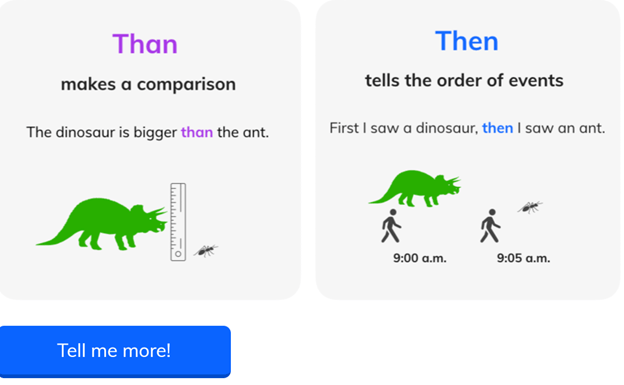
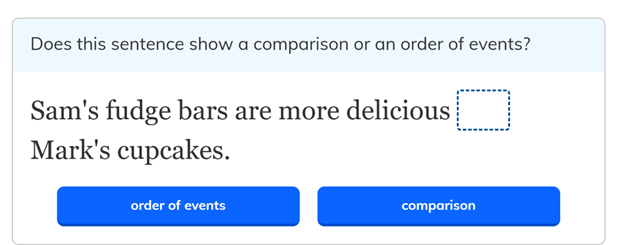
These are inbuilt capabilities that are automatically designed for the students as they access the lesson. A tutorial requires two mouse clicks to guide the lesson in terms of clicking the correct answer. The tutorial drills down into each homophone a student selects and leads them to the underlying differences between the words from meaning to structure.
After providing a deep exploration of the homophones, it gives the student a Practice area in which the student explores the composition of the homophones and their distinct structural and semantic differences. The hands-on lesson is well-chunked, focused, and directed towards clarifying all the doubts surrounding the soundalikes.
As in IXL, the teacher can grade the exercises using artificial intelligence, which grades automatically as a built-in tool component.
These tools demonstrate what an educator can do with software to help speed the processes that would have otherwise taken so long to accomplish (American College of Education, 2023). They may not be cloud-based, but they are accessible only through an internetwork connection. This means they are accessible globally, and the students can do their work and have it assessed and graded from anywhere and at any time (American College of Education, 2023).
Martin, G.; Khajuria, A.; Arora, S.; King, D.; Ashrafian, H.; Darzi, A. (2018). The impact of mobile technology on teamwork and communication in hospitals: a systematic review. Journal of the American Medical Informatics Association, 26(4). https://doi.org/doi:10.1093/jamia/ocy175
Pathak, T. (2022). Innovative Technology in Higher Education: Opportunities and Challenges. Journal of Management & Public Policy,13(2), 4–15. https://doi.org/10.47914/jmpp.2022.v13i2.001
Accessibility is not only the act of making content available to a vast number of people, but it is more so the fact of making content on any platform available to everyone qualified to benefit from it. This includes especially those with an impairment of either a physical, mental, or psychological nature (King & Piotrowski, 2021).
The prevalence of technology today has imposed on designers to consider the needs of the users of various strands. This means considering the accessibility of the software programs they are designing for those with disabilities. It is a moral responsibility and a legal imperative (Huss, 2022). Up to 12 percent of the US population is people considered disabled in one way or the other.
As a result, it is also a good marketing strategy to cater to the needs of this segment (King & Piotrowski, 2021). Programs like MS Word that are universally used for word processing need to adhere to accessibility requirements to address the legal imperatives and market demands of a growing population.
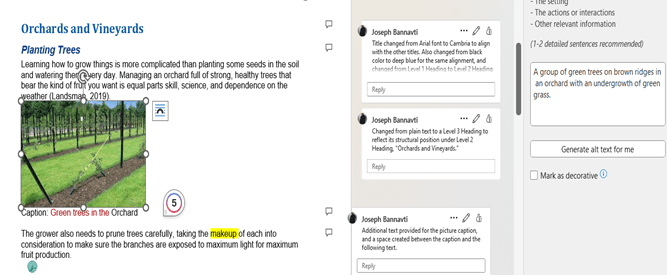
In this context, we analyze a simulated MS Word document to determine its accessibility. The Headings of the instructional component of the Accessibility Resource document mostly comply with accessibility requirements because they use Cambria font for the title and Level 1 Headings. When it continues to Level 2 Headings, the writer still wants to impose a Level 1 Heading, which would not fit the document’s structure, although it may seem visually allowable. The text used in the body paragraphs of the simulation section is Arial, which is uniform all through. These are the two elements that are accessible in the entire document.
Modifications
The text color, headings in the simulation, alternative text, lack of spacing between paragraphs, insufficient picture captions, and lack of captions in some images are some of the accessibility issues in which the document is deficient. To make the document accessible, the red text color was changed to blue, headings in the simulation were given their logical position in the document structure, making sure there were no skipped level headings, alternative text was introduced into the document, and spacing was created between paragraphs. Insufficient (single-word) image captions were made more explicit by adding a few descriptors. There were no captions in some cases, so they were added to the images. In most cases, the accessibility mechanisms were available in Word- whether to change text color, add Alt text, add comments, or change Headings or font type and color. It was a matter of using WebAim for guidance to identify the proper process.
I recommend WebAim.org, Word 365 and 2019 for Windows; Microsoft support website – how to make your Word documents accessible to people with disabilities; Userway’s Next-gen Web Accessibility.
BEFORE
AFTER
References
King, C., Piotrowski, C. (2021). Navigating the ADA accessibility Requirements and legal pitfalls in online education. College Student Journal, 5(2), 127–134.
Huss, J. A. (2022). A high school website Is a school community’s communication center…but is it ADA compliant? School Community Journal, 2022, Vol. 32, No. 1 http://www.schoolcommunitynetwork.org/SCJ.aspx
This computer lab for the Sociology department will be U-shaped, with most of the computers sitting along the arms of the U -which will be along the walls. The computer hardware will be HP ENVY Desktop TE01-5000T PC with Intel Core i7 14th Gen and running Windows 11 Professional. It will have 15-inch monitors and wireless access capabilities.
Other tools will include: – A scanner – Digital camera – Printer – Microsoft 360 – Google Workspace – Graphics software – Video editing software – Tables and chairs along the walls.
Impact and Value
This computer lab will benefit the sociology students and the college by: – Reducing traffic to the science lab – Providing sociology students with an easier way to do research. – Allowing Sociology students to learn computer software – Providing the instructors a location to track the students on task and leverage new and emerging technologies to facilitate their teaching. – Arming students with extra computer skills, preparing them to embrace the post-college world. – Providing Sociology students access to the college’s LMS (Canvas). – Providing the instructors adequate access to the students and allowing them to comment on their’ work.
Although the lab has been designed without the participation of the students, it has been designed with them at the center of the strategic thinking (Casanova et al., 2023). The lab will be upgraded every 5 years to keep pace with technology and the students’ evolving needs.











 Educational Technology Resources